
DEMO #
韌體線上更新 #
GoYak線上燒錄系統【傳送門】
使用方式:
UART命令定義 #
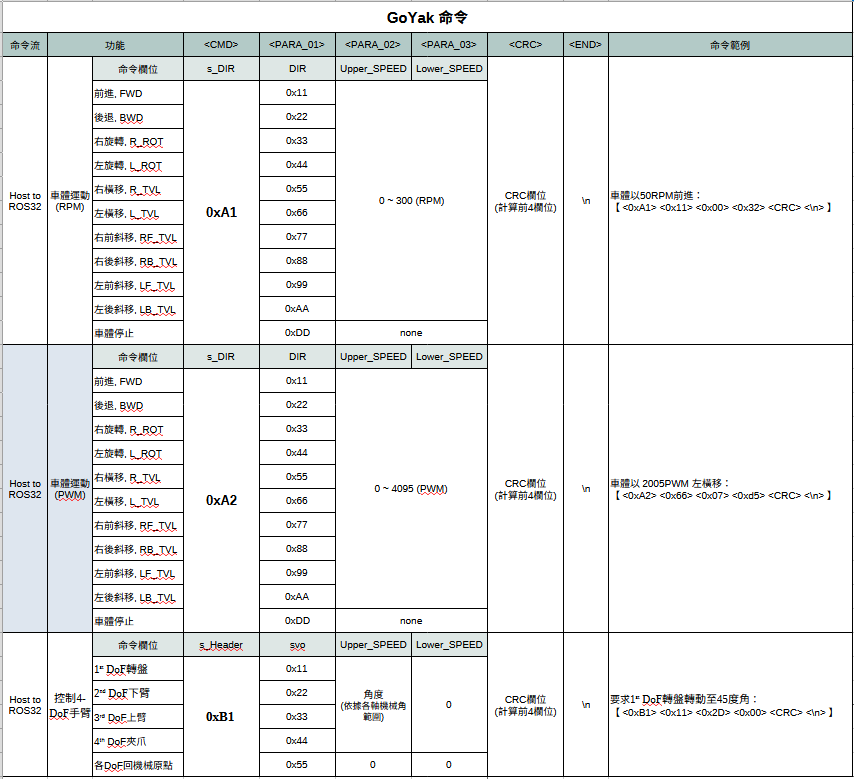
目前ros32開放3種UART命令,每個參數欄位(uint_8)。
【0xA1】命令:控制車體以RPM進行omni運動。
【0xA2】命令:控制車體以PWM進行omni運動。
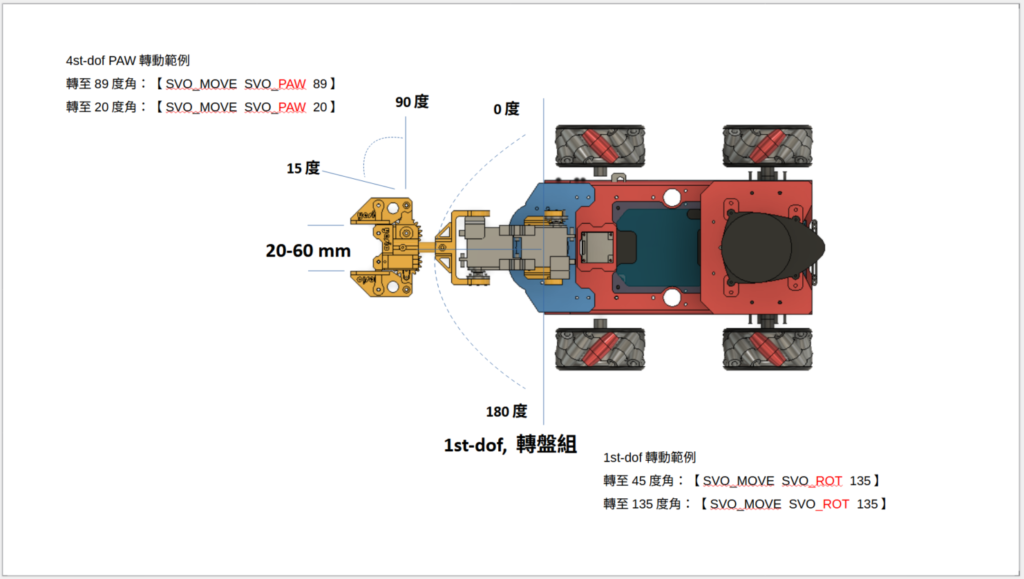
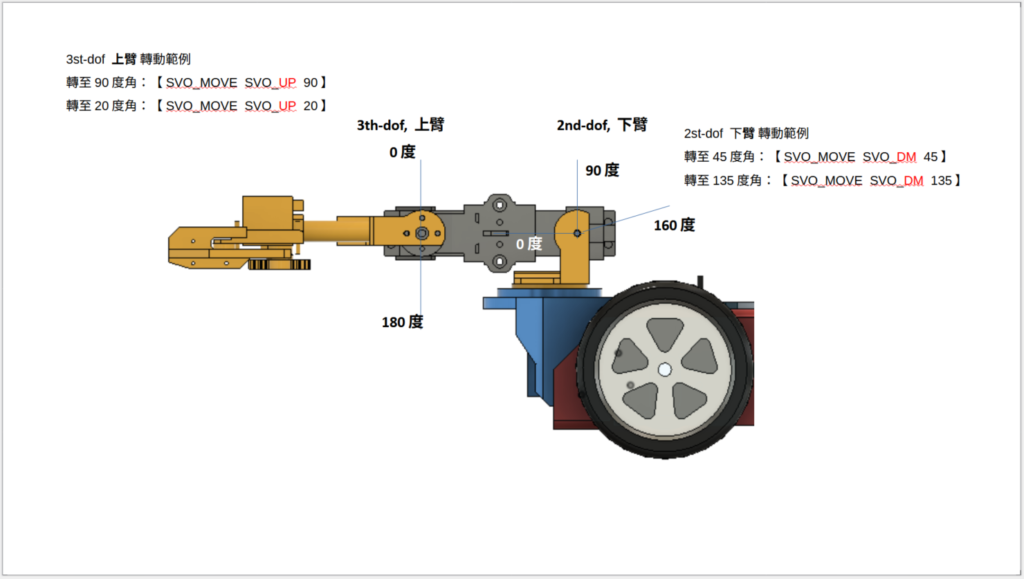
【0xB1】命令:分別對各軸MG995伺服馬達下達角度(角度範圍,請依據下圖各軸機械角規範)。
範例程式 #
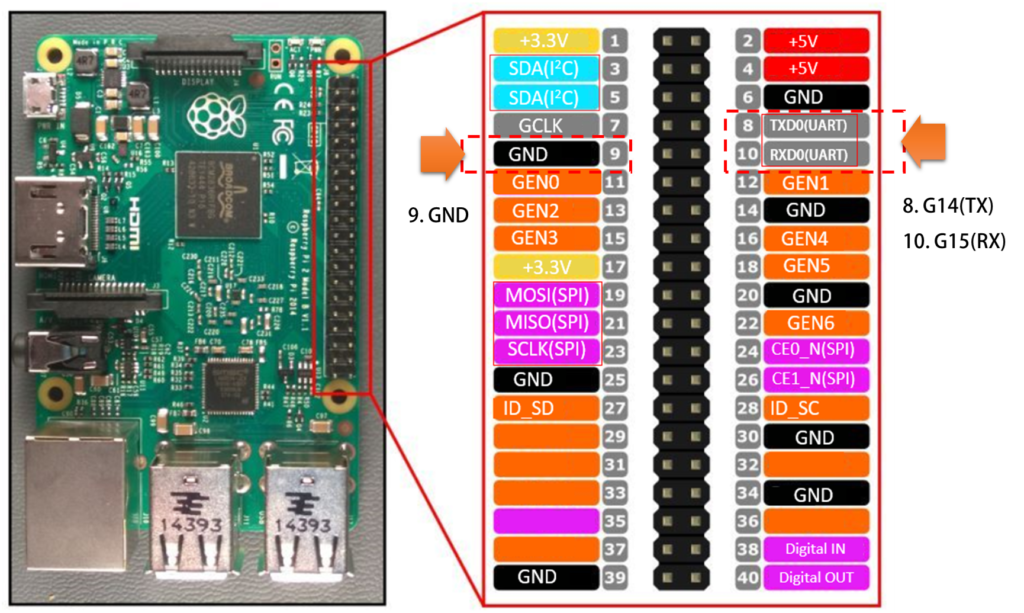
本範例使用G14、G15、GND腳位
CRC範例 #
def calculate_crc(data):
    crc = 0
    for byte in data:
        crc ^= byte  # XOR 累加
    return crc
UART 發送運動命令範例(Raspberry Pi 5) #
注意:Pi 5實體UART裝置指向 port=”/dev/ttyAMA0″
import serial
import time
import random
def calculate_crc(data):
    crc = 0
    for byte in data:
        crc ^= byte  # XOR 累加
    return crc
# 設定 UART 連接埠 (根據你的 Raspberry Pi 硬體調整 ttyS0 或 ttyAMA0)
uart = serial.Serial(
    port="/dev/serial0",  # Raspberry Pi 內建 UART
    baudrate=115200,
    bytesize=serial.EIGHTBITS,
    parity=serial.PARITY_NONE,
    stopbits=serial.STOPBITS_ONE,
    timeout=1
)
def send_data():
    command_List = [0x11, 0x22, 0x33, 0x44]
    command = random.choice(command_List)
    rpm = random.randint(50, 200)
    data = bytearray([0xA1, command, 0x00, rpm])  # 前 4 個 bytes
    crc = calculate_crc(data)  # 計算 CRC
    data.append(crc)  # 添加 CRC
    data.append(0x0A)  # 結尾 'n'
    uart.write(data)
    print("Sent:", data.hex())
    time.sleep(5)  # 每5秒隨機送一筆運動命令
if __name__ == "__main__":
    try:
        while True:
            send_data()
    except KeyboardInterrupt:
        print("nExit program.")
        uart.close()
UART發送運動停止命令(Raspberry Pi 5) #
注意:Pi 5實體UART裝置指向 port=”/dev/ttyAMA0″
import serial
import time
import random
def calculate_crc(data):
    crc = 0
    for byte in data:
        crc ^= byte  # XOR 累加
    return crc
# 設定 UART 連接埠 (根據你的 Raspberry Pi 硬體調整 ttyS0 或 ttyAMA0)
uart = serial.Serial(
    port="/dev/serial0",  # Raspberry Pi 內建 UART
    baudrate=115200,
    bytesize=serial.EIGHTBITS,
    parity=serial.PARITY_NONE,
    stopbits=serial.STOPBITS_ONE,
    timeout=1
)
def send_data():
    #command_List = [0x11, 0x22, 0x33, 0x44]
    #command = random.choice(command_List)
    #rpm = random.randint(50, 200)
    data = bytearray([0xA1, 0xDD, 0x00, 0x00])  # 停止車體運動
    crc = calculate_crc(data)  # 計算 CRC
    data.append(crc)  # 添加 CRC
    data.append(0x0A)  # 結尾 'n'
    uart.write(data)
    print("Sent:", data.hex())
    time.sleep(5)   # 每5秒隨機送一筆運動命令, 沒有特別意義!
if __name__ == "__main__":
    try:
        while True:
            send_data()
    except KeyboardInterrupt:
        print("nExit program.")
        uart.close()
Troubleshooting #
注意:Pi 5實體UART裝置指向 port=”/dev/ttyAMA0″
#sudo raspi-config
 > interfacing options
 > Serial port
> No (shell停止UART) / Yes (硬體UART啟用 GPIO14(TX), GPIO15(RX)) 


